KB Article #4908
CollisionLink Shop users have the ability to include in-stock parts on an estimate. After importing an estimate and viewing the parts list in the unsent order details, shops can update a part line to show that it is in stock by clicking the Request drop-down and selecting Do Not Process before sending the order to the selected dealer.
When the dealer receives and views the order details in CollisionLink, OE or non-OE parts that the shop submits as Do Not Process will display in the Upsell Parts section instead of the OE Parts. This is done to prevent dealers from accidentally sending parts that are not needed by the shop.
In-stock part lines will include Do Not Process in the Buyer's Request column and (DO NOT PROCESS) in the description for easy identification. Evaluate these parts and consider offering a competitive price or a more reliable OEM part in its place. 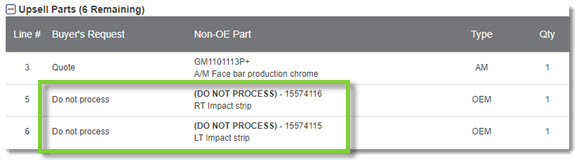
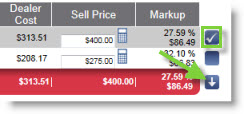
Do Not Process parts will not be checked/selected automatically. If you want to offer the shop a quote or if the shop wants you to fulfill the part, check the part line and then click the arrow to drop the part into the Order Status section before sending a response to the shop or completing the order.