KB Article #455
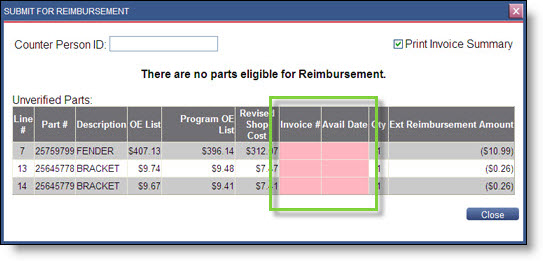
The Submit for Reimbursement window will display any information that needs corrected in pink before an order can be submitted for reimbursement. If you are unable to submit a program order for reimbursement, check the following items:
- There must be an available date for each part number in order to submit with reimbursement.
- There must be an invoice/quote number attached to each part number in order to submit for reimbursement.
- Within the Counterperson ID, there must be no spaces.
- Make sure each part you want to submit has a Status of Invoiced and not Quoted.
- Verify the List/Cost for any item is not $0.
- Determine if any items in the Line column indicate that it is a manually added part. The dealer will need to delete these parts.
To correct an order:
- Click Submit for Reimbursement.
- If a pink box appears and informs you to input List/Cost pricing info, type the List/Cost of the part.
- Resubmit the order for reimbursement.
- If this does not work, contact OEC Customer Support for assistance.