KB Article #3346
Claim Validation (SA&A) is an OEM process facilitated through CollisionLink that ensures program reimbursements are awarded for valid part sales.
Claims that have been submitted for reimbursement in CollisionLink are validated against invoice and RO information from your Dealer Management System at the end of the settlement month to verify.
If differences are found with part numbers, invoice numbers, or the quantity fulfilled then a claim discrepancy is created in CollisionLink so you can conveniently:
- Respond with a correction.
- Report a part was not sold or was returned.
- Dispute the discrepancy. (Click here to learn how to access and respond to a claim discrepancy.)
The OEM will approve or reject all disputed discrepancies prior to month's end. The following will result in a charge or reversal from the OEM on your claimed amount for a part:
- Discrepancies that you haven't responded to before the deadline (Discrepancy Status = Expired).
- Parts that were not sold or returns were not processed for.
- Disputed discrepancies rejected by the OEM (Discrepancy Status = OEM Rejected).
Monthly charge-backs/reversals are compiled in Microsoft Excel reports which are made available to you for download in CollisionLink.
To access and download monthly charge back reports:
- From the CollisionLink tab, click Validation Charge Back under the CollisionLink Tools menu.
- The Validation Charge Back window will display a record for each month. Click the Download link by the desired month.
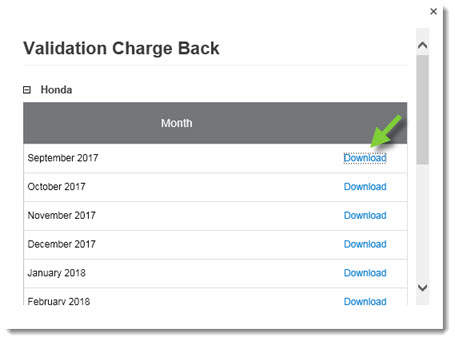
- Click Open to view or print the information or click Save to save the file on your computer.

- When finished, click the X in the upper right-hand corner of the Validation Charge Back window to close.
Note: Please contact your OEM representative if you need to address any specific charge back cases.