KB Article #1560
Orders with the following statuses cannot be modified:
- Order Confirmed (A PartsTrader-only order status)
- Canceled
- Completed
- Submitted for Reimbursement
If an order with a Status of Canceled, Completed, or Submitted for Reimbursement needs changed, the shop must resend the transaction.
If an order was submitted for reimbursement with an incorrect invoice number:
- Process a return for the order. (Click here for instructions.)
- Contact the shop and ask them to resend the order.
- If the transaction was sent from PartsTrader, please have the shop resend through PartsTrader.
- If the transaction was sent from CollisionLink Shop:
- From the Jobs tab of CollisionLink Shop, locate the vehicle that needs resent and click the vehicle name to view.
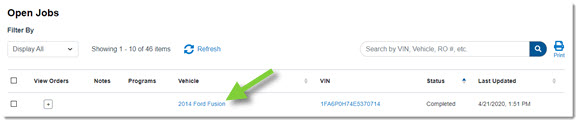
- Click Resend Job.

- Verify the correct Dealer is listed. If not, use the drop-down to update.

- Check the box(es) next to each part you wish to resend. (Check the box at the top to select all parts.)
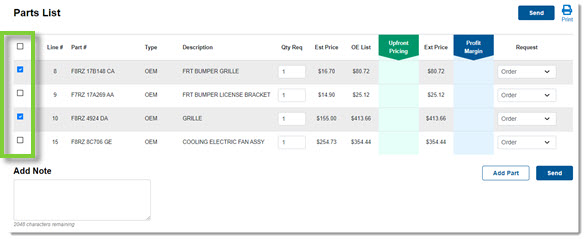
- Click Send to send the new order to the dealer.
- From the Jobs tab of CollisionLink Shop, locate the vehicle that needs resent and click the vehicle name to view.