KB Article #6525
RepairLink offers shops the opportunity to select a delivery option when ordering parts from your dealership. Delivery options can be set for an entire order or for specific parts within an order. These options are available for both automotive and International/IC Bus orders.
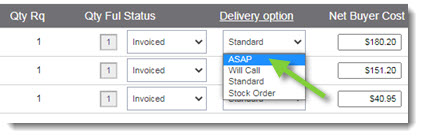
Shops can select from one of the following before sending the order to your dealership:
- Standard: Your standard shipping method. (This is the default selection.)
- Will Call: The shop will pick up the parts at your dealership.
- Stock Order: Usually reserved for a larger quantity of parts, this option allows you send the parts to the shop as they become available until the order is fulfilled.
- ASAP: The shop is requesting their parts order be delivered as soon as possible.
To review an order's delivery option:
- From the RepairLink Overview window, open the shop order.
- Within the order details, locate the shop's selected Delivery Option in the Buyer Request section.
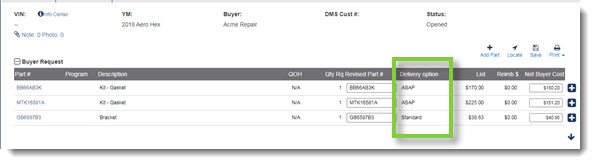
- To change the delivery option, you must add the parts to the Response to Buyer section. Once added, use the Delivery option drop-down to select the new delivery method.
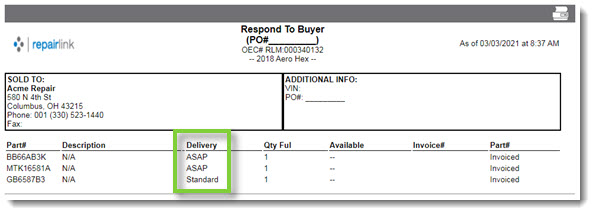
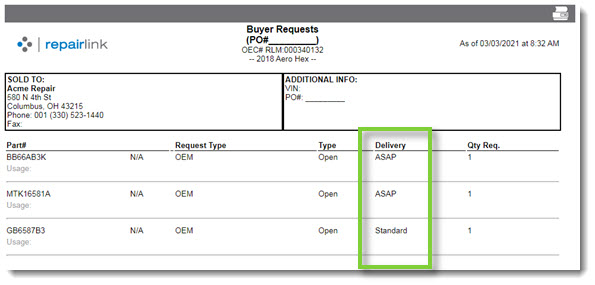
Note: Delivery information will display on the following reports:
- Buyer Requests:
- Response to Buyer: