KB Article #4520
If you are subscribed to DMS Connect, MarketplaceDirect will connect to your DMS to retrieve part availability information (Quantity on Hand)--based on the Default DMS Customer Number configured in your DMS Connect Settings--upon opening an order. If the DMS Customer passed is invalid or not set up in MarketplaceDirect, the following message will display at the top of the order details window.
DMS Cust # not available. As a result, QOH will not display. To ensure this information is available on future orders, please validate default DMS Cust # in your DMS Connect Set Up.
Follow the process below to check your Default DMS Customer Number and make corrections where needed.
To check the Default Customer Number set up for DMS Connect:
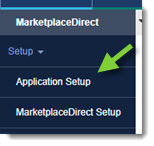
- From the MarketplaceDirect tab, click Application Setup.
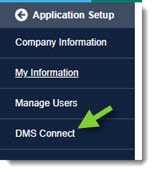
- From the Application Setup menu options, click DMS Connect.
- Review the information in the Default DMS Customer Number field.

- If a number is provided, verify it against your DMS and correct as needed.
- If the field is blank, obtain the number from your DMS and type it in the field provided.
- Click Save to store any changes.