KB Article #2223
MarketplaceDirect automatically notifies users (any user that OEC has associated with the account) of all new orders that arrive. Notifications are received in two ways:
- Real-Time Order Notification: MarketplaceDirect displays an on-screen, real-time notification when you receive a new order.
- This notification is automatically displayed in the upper right-hand corner of the window. Hover your mouse over the notification to view a summary of the new orders.
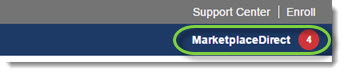
- Click on a New order from... link to instantly view the order details
-or-
Click View All... New Orders to display your new orders on the MarketplaceDirect tab.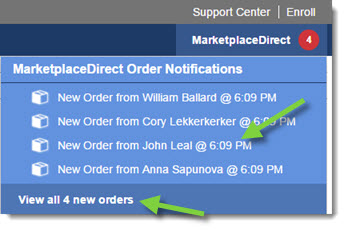
- This notification is automatically displayed in the upper right-hand corner of the window. Hover your mouse over the notification to view a summary of the new orders.
- Email Notifications: MarketplaceDirect allows you to automatically send email notifications to specific users at your dealership--alerting them when new orders arrive. Once notifications are created, they can be edited or removed at any time. (Click here for more information on creating email notifications.)