KB Article #2998
MarketplaceDirect gives you the flexibility you need to control how shipping costs are charged to your buyers on eBay. The following options are available when passing along shipping costs:
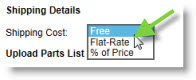
- Free: No shipping costs will be charged to your buyer.
- Flat Rate: A specific dollar amount will be charged to every order.
- Percentage: Charge a percentage of the dealer cost for the part. Use the Minimum Shipping Cost to ensure you don't lose money on the transaction. If the percentage of the dealer cost is less than the Minimum Shipping Cost you specify, the Minimum Shipping Cost will override the percentage of the dealer cost for the part. Note: The Percentage option should not be used for BMW, Hyundai, Kia, Mercedes Benz, Mitsubishi, Porsche, Subaru, and Volvo parts.
The shipping cost can be configured separately for each new part list that you create or add to lists you already have in place. Shipping costs will also display on exported part lists. Once configured, shipping costs will display on the bottom of each order. 
To add shipping costs:
- From the MarketplaceDirect tab, click MarketplaceDirect Setup.
- Click the I want to drop-down and select Create Parts List to create a brand new list.
-or-
Select Edit Parts List to update shipping on an existing list.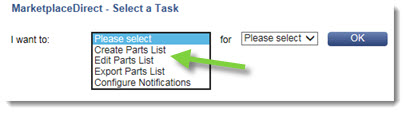
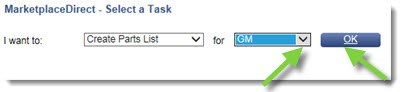
- Select the OEM you wish to create or update the list for then click OK.
- Use the Shipping Details section to control how shipping costs are charged to your eBay buyers.
Click here for complete instructions on creating or editing parts lists.