KB Article #2216
Your MarketplaceDirect parts lists can be exported at anytime.
To export your parts list:
- From the MarketplaceDirect tab, click MarketplaceDirect Setup.
- Click the I want to drop-down and then select Export Parts List.

- Select the OEM from the second drop-down.
- Click OK.
- From the List drop-down, select the list you want to edit.

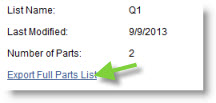
- Details about the current parts list will display. Click Export Full Parts List.
- Click Open to view the file immediately.
-or-
Click Save and then select the location on your computer where the file should be saved.