KB Article #4140
Follow these Best Practices to detect and prevent fraud before it can negatively impact your business. Note: To return to the legacy view of orders, click Go to Recent Orders - Legacy. (Click here for legacy instructions.)
- The colored tabs on the left of each order give you an at-a-glance indication of the quality of the order.

- A green tab with a letter grade of "A" or "B" indicates that the order is warning-free.
- An orange alert box indicates one or more of the following alerts:
- Payment only authorized
- Order payment withheld
- Approved payment attempt with alternate name
- Payment not captured
- Previous canceled orders
- Payment conditionally approved
- Possible freight forwarder
- Previously known IP address
- A red alert box indicates one or more of the following alerts:
- Fraudulent order history
- Failed address verification
- Declined payment attempt with alternate name
- Payment not yet received
- Order parts total error
- Alternate username detected
- Alternate shipping address detected
- Alternate billing address detected
- Click Show More to view the order details.
- Click View Details on the alert.

- Check the IP locator. A big indicator of fraud is when the IP address is out of the country.
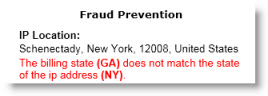
- Do the Billing Address and Shipping Address match? If not, contact the customer and do some more research.

- When contacting the customer, make sure you get someone on the other line. Leaving voicemails or sending emails are fine, but be sure to get a response.
- On your Order Details tab, in the Fraud Prevention section, click on the available Address Look Up links to look up the customer's phone, email address, and shipping/billing address. Note: If your customer is shipping to a FedEx store or the location is a known drop-ship address, this is typically a red flag.
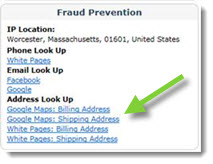
- Take a look at the email address. If the name on the email address does not match the name given or if the e-mail address contains a random combination of numbers and letters (i.e. 1234XYZ@gmail.com), this could be an indicator of fraudulent activity.
- If it was a credit-card transaction and the address or zip code are conflicting or missing, do more research before shipping the order.
- Remember, you don't have to fulfill every order. If you are worried about it possibly being a fraudulent order don't move forward.
- As a rule of thumb, if it's an expensive order, do some more research. Every dealership has a different threshold of the amount so figure out what makes sense for your business.
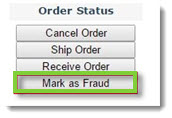
- If you identified that a ConsumerLink Pro order is fraudulent, click the Mark as Fraud button on the Order Details window.
Fraud Detection Best Practices (Legacy View)
- Check the IP locator. A big indicator of fraud is when the IP address is out of the country.
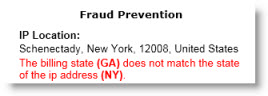
- Do the Billing Address and Shipping Address match? If not, contact the customer and do some more research.

- When contacting the customer, make sure you get someone on the other line. Leaving voicemails or sending emails are fine, but be sure to get a response.
- Remember, you don't have to fulfill every order. If you are worried about it possibly being a fraudulent order don't move forward.
- As a rule of thumb, if it's an expensive order, do some more research. Every dealership has a different threshold of the amount so figure out what makes sense for your business.
- Look for the alerts on the ConsumerLink orders. This can range from customers that have already been marked as fraud from other customers on the ConsumerLink platform to "This order IP address has been used by multiple customers." These are great indicators of possible risk. The following alerts may display:
- A green (
 ) check on the Recent Orders window indicates the customer has had previous successful orders.
 - The green (
 ) dot indicates the order is warning-free.
 - An orange (
 ) dot indicates one or more of the following:
- Payment only authorized
- Order payment withheld
- Approved payment attempt with alternate name
- Payment not captured
- Previous canceled orders
- Payment conditionally approved
- Possible freight forwarder
- Previously known IP address
- A red (
 ) dot indicates one or more of the following:
- Fraudulent order history
- Failed address verification
- Declined payment attempt with alternate name
- Payment not yet received
- Order parts total error
- Alternate username detected
- Alternate shipping address detected
- Alternate billing address detected
- A green (
- Inside the ConsumerLink order, look at your Notes tab. If it was a credit-card transaction and the address or zip code are conflicting or missing, do more research before shipping the order.
- On your Order Details tab, in the Fraud Prevention section click on the available Address Look Up links to look up the customer's phone, email address, and shipping/billing address. Note: If your customer is shipping to a FedEx store or the location is a known drop-ship address, this is typically a red flag.

- Take a look at the email address. If the name on the email address does not match the name given or if the e-mail address contains a random combination of numbers and letters (i.e. 1234XYZ@gmail.com), this could be an indicator of fraudulent activity.
- If you identified that a ConsumerLink Pro order is fraudulent, click the Mark as Fraud button on the Order Details window.
