KB Article #1536
ConsumerLink provides you with a generic template for the privacy policy for your site. You can quickly tailor this to your business practices or paste your existing policy into the provided field. Note: ConsumerLink Setup options can only be accessed by the ConsumerLink Administrator.
To update your privacy policy:
- From the ConsumerLink tab, click ConsumerLink Setup.
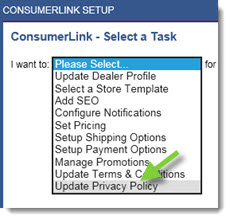
- Click the I want to: drop-down and select Update Privacy Policy.
- Select your OEM from the OEM drop-down.
- Click OK to display the privacy policy configuration.
- The Privacy Policy field contains sample text for your reference. You will have to edit this text to make it specific to your website. To return to the default privacy policy text, click Reset to Default. If you have an existing privacy policy, simply paste this into the provided field.

- Click Save.