KB Article #2559
Parts uploaded to eBay that have a Core Price will display with a listing price that reflects the dealer's discounted sales price plus the core price.
Example:
| Part Number | Part Description | Selling Price | Core Price | eBay Listing Price |
| 682111057AA | ENGINE - SHORT BLOCK | $1843.75 | $500.00 | $2343.75 |
Dealers should check the show cores option within their Parts Center Profile even if they do not accept core returns. This option ensures listings include a statement that the sales price includes a core of $X (the core charge is listed). If you don't check the box, the price will still include both the discounted price and the core price, but the buyer will not be notified there is a core charge.
OEC receives core price information from the following OEMs:
- Chrysler
- Ford
- General Motors
- Infiniti
- Mazda
- Nissan
- Saab
- Toyota
Notes:
- If OEC does not receive core prices and information for your OEM, do not check the the Show core charges in the listings option. (If OEC does not receive this information from the OEM, it cannot forwarded to eBay.)
- The only manufacturers that OEC can confirm accuracy of core data are General Motors and Ford. All others may have gaps in the core data, and it may be appropriate to remove items with cores or price them higher to include the core in case it is not present in the manufacturer's parts master.
To show core charges on listings:
- Visit the eBay Parts Center: https://partscenter.ebay.com/.
- Sign into the Parts Center using your eBay business user ID and Password.
- Click on Manage Profile.

- Click the Core Charges link to open.
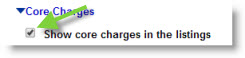
- Check the Show core charges in the listings option. (If OEC does not receive core prices and information for your OEM--as listed above--do not check the the Show core charges in the listings option.)
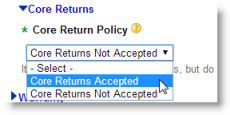
- Select your Core Return Policy from the drop-down. (Core Returns Accepted or Core Returns Not Accepted)
- Click Save.